Featured Post

Claude Code for Beginners: Step-by-Step AI Coding Tutorial

Image
 Artificial Intelligence is changing how developers write software. From generating code to fixing bugs and explaining complex logic, AI tools are becoming everyday companions for programmers. One such powerful tool is Claude Code , powered by Anthropic’s Claude AI model. If you’re a beginner or  an experienced developer looking to improve productivity, this guide will help you understand  what Claude Code is, how it works, and how to use it step-by-step . Let’s get started. What is Claude Code? Claude Code is an AI-powered coding assistant built on top of Anthropic’s Claude models. It helps developers by: Writing code from natural language prompts Explaining existing code Debugging errors Refactoring code for better readability Generating tests and documentation In simple words, you describe what you want in plain English, and Claude Code helps turn that into working code. It supports multiple programming languages, such as: Python JavaScri...

How to Use For loop List Option Quickly

For loop is main concept in Python programming. Out of all the For Loop options, the list option is so popular. If you know, how to use this concept, you can write any number of programs quickly and with less effort.

Using for loop you can get index for list items. You can print list elements using for loop.

If you take any language, the loops play a vital role.
for loop using list in python

How to Use For Loop

When you want to deal with data of multiple values, you need loops. So, For Loop is so famous because, you can control multiple input values.

Syntax to Write For Loop

       
for i in my_list:
    print(i)


The 'i' says variable that represents value in the 'my_list'. The for helps to iterate the list values one by one.

Example Program For Loop List in Python

           my_list=[2,3,4]
           for i in my_list:
                print(i)       
 

Result

           2
           3
           4

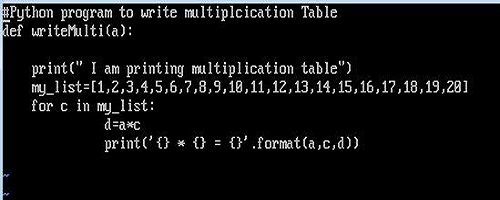
How to create Multiplication Table using Python For-Loop List Option.

Function to create table

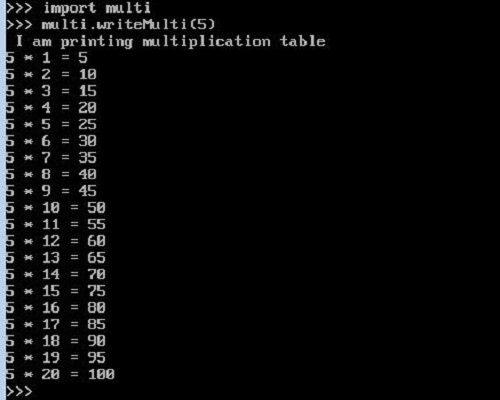
Result of function that generated Multiplication Table 

 
how to create table in python
Creating multiplication table in python

Bottom Line

  1. You can use for loop to calculate Factorial and listing values one by one.
  2. Your input data contains multiple values, then For loop is so useful.

References

  1. SanFoundary for Python Sample Programs

Top Courses

Top Books
  1. Taming Python by Programming

Comments

Popular posts from this blog

SQL Query: 3 Methods for Calculating Cumulative SUM

Step-by-Step Guide to Reading Different Files in Python

5 SQL Queries That Popularly Used in Data Analysis